Searches can be shared with other users on your team, similar to how reports are shared. You can share a search with everyone in your organization by adding it to the Library, or limit access to specific users, public groups, or permission sets.
Searchable always verifies object, field, and record access before running a search, so users only see data they are authorized to view. This helps prevent accidental data exposure. To ensure the best experience, we recommend removing objects and fields that are not universally accessible before sharing a search.
Required Permissions #
Only available when user has the Searchable Manager permission set.
How to Share a Search #
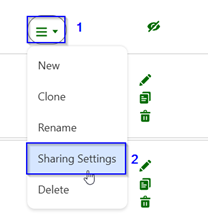
- Click Gear
 icon to open settings
 - Click
 dropdown
 - Click Sharing Settings
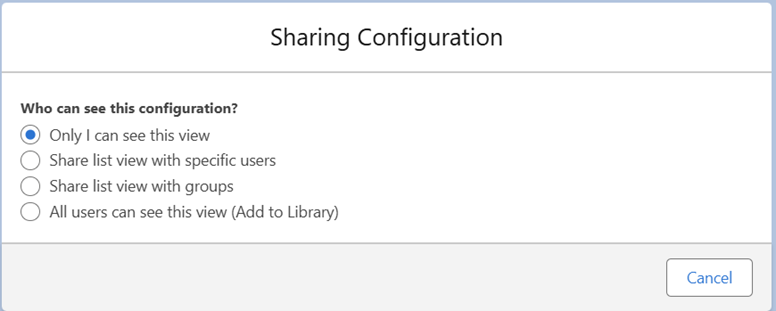
Who can see this configuration?
- Only I can see this view
- Share list view with specific users – Search for individual users to share with
- Share list with group of users: Select public groups or permissions sets to share this view
- All users can see this view: Available to all users


